At LifeChurch.tv, we're in the middle of the migration project from Exchange 2003 to Exchange 2007. So far, it's been going very well. Our single Exchange 2003 Enterprise box is held together with duct tape, chicken wire and spit. Well, not really, but almost. It's a nice box – a 4 year old Dell 2650 with a few gigs of ram, 100gig of local storage for OS and 700gig of attached storage for the mailstore. The issue is that the mailstore is over 500gigs and the attached storage array has a failed drive, no support, and throwing errors every few seconds. It's literally screaming and flashing red warning lights, and needs help.
In August/September, shortly after re-joining the team, I got the new Exchange 2007 Enterprise server setup. I've gone through a few Exchange 2007 transitions already, and they have been fairly smooth, but this one was a different animal. A more mobile workforce, lots of PDAs, 99% of our users are laptop users with VPN access and remote email access – so a downtime window is non-existent. Add on top of that our AWESOME Internet Campus which meets several times at all hours of the day/night and you can see that it's not like there is any real time to move things and cause zero disruption.
So, little by little, we've been scheduling and moving mailboxes. It's been slow because of the old storage issues, backup windows, nonstop disk access by those "working", etc. We're almost there. If all goes according to plan, our last Central group (Finance) and our last Campuses (Tulsa and South Tulsa) will make the switch.
I wanted to document our setup, and add a few little "gotchas" that we ran into in hope that it might help someone else out there. I won't give exhaustive how to setup Exchange 2007, but these are specific issues that plagued us.
First of all, we have virtualized Exchange 2007. I've added Exchange as a Virtual Machine in our VMWare ESX 3.5 Cluster. I gave it the following attributes:
- 2 vCPUs (2.33Ghz cores)
- 16gig vRAM (32gig physical on each of 3 – N+1 – ESX hosts)
- 30gig C: drive (just for OS) – on 15k storage
- 750gig Data drive (for the datastores – it's 15k rpm virtualized storage on our EMC SAN)
- 40gig P: drive for Pagefile – again, virtualized
- I set the pagefile to manually grow between 24gig and 40gig
- Server 2003 R2 x64 – Must be 64bit… we weren't ready for Server 2008 at this time
- Exchange 2007 SP1
During the install and testing, I ran into a couple small issues related to certificates and virtual directories. These we resolved quickly, but here are a few details.
The first couple issues were when we moved mailboxes, and then launched Entourge or Outlook, we got a couple errors you can see below…
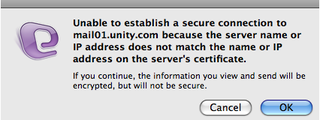
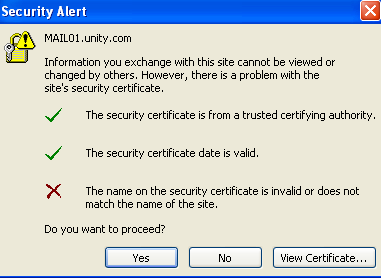
mail01.unity.com is the internal FQDN of this box. mail01.lifechurch.tv is how we want to hit it, and that's the CN on the SSL certificate. They don't match. Entourage and Outlook were not happy. I spent many hours in the Exchange Console and changed everything I could. I was in IIS and changed things there too. No luck.
But, my buddy Barry – one of the principals and Technical Architect at Mirazon (my favorite consulting firm) came through. He hooked me up with a Powershell script that HE got from the Exchange Ninjas
So, I copied that set-allvdirs.ps1 script to my mailserver c: drive… Launch the Exchange Management Shell and run it…
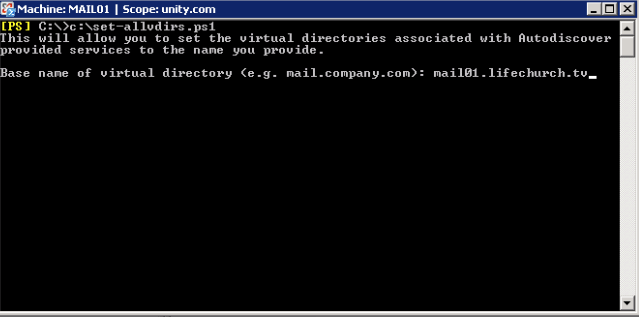
Hooray! Problem solved.
So far so good. Machine built. I can move a user over. They can launch both Entourage (Mac) and Outlook (PC) without errors. We then start moving dozens and dozens of users over. They move easily… about 50-60gigs a nice… All is going well… **insert ominous music here*
And then…
Errors. Sluggish Performance. Unable to RDP. S – L – O – W.
What in the world? Things were going so well. I haven't had these particular issues mainfest themselves before. Things were good for a few hours… or a day… then grinding halt. The only way to fix was a reboot. Of a production mailserver. In the middle of the day. How many of you IT guys out there just screamed? Me too.
This I knew… rebooting it helped. But, what was the root cause? A quick look through the Application Event logs revealed a new term I had never heard before – Back Pressure.
We were getting slammed with Exchange MSExchangeTransport Error / Event ID 15004. Resource pressure increased from Normal to Medium. Shortly thereafter, another 15004. Resource pressure increased from Medium to High. A typical error looks like this.
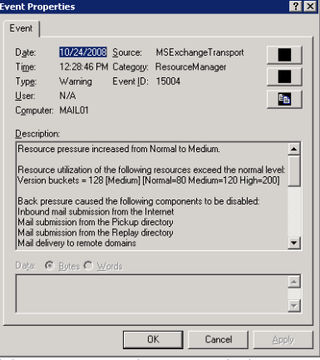
After the pressure goes from Medium to High, it's basically causes the Exchange 2007 Hub Transport service to go into total lockdown. No messages in. No messages out. This is bad news. But, the MSExchangeMailSubmission Error / Event ID 1009 is logged and that looks like this.
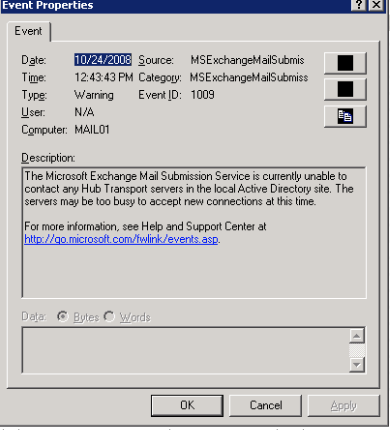
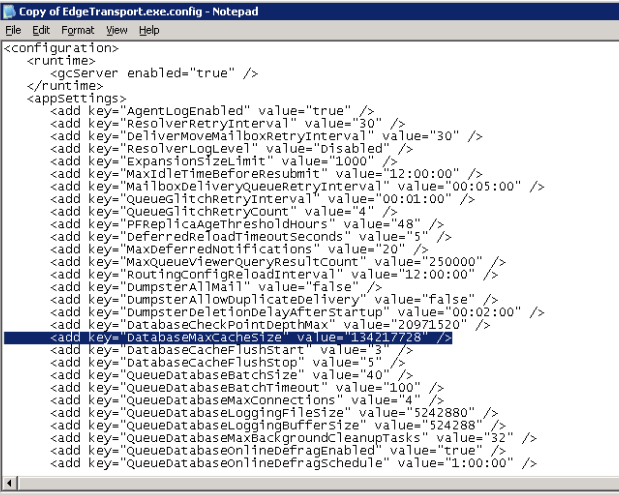
So, sluggish performance. Reboots fixes it. Time passes while reading a bazillion Technet articles. Time to find an answer…I went to my favorite Exchange Blog, EHLO, and found this entry which really seemed to fit. It was using big words like Back Pressure (I recognize that one), and Version Buckets (?) and gave a fix to change a DatabaseMaxCacheSize variable from 128Meg to 512Meg. Sounded reasonable and it sounded like it might do the trick.
So, I went to find the EdgeTransport.exe.config file – it's found in your Exchange Installation folder in the bin directory. Here's the before shot:
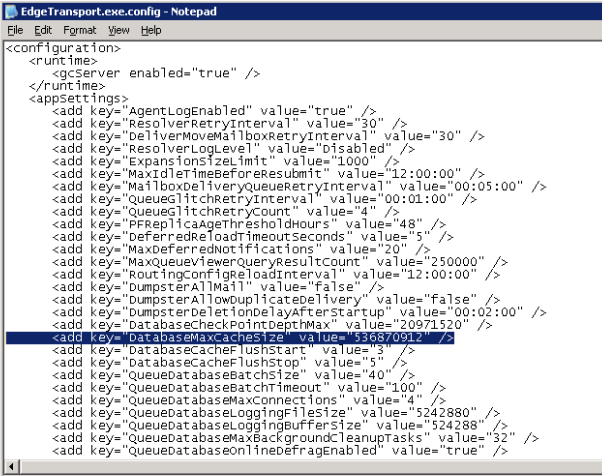
And here's after the change… again, we moved this setting to 512meg.
I didn't know exactly what to restart after making this change, so I simply rebooted the server. Why not? I've rebooted it every few hours for days now anyway… what's another reboot?
Wow, things look good. The errors go away, but performance still lags. So, a little more reading and I stumble upon yet ANOTHER new term – TCP Chimney. This EHLO blog describes the issue.
There are two possible fixes… you can see the text snippet below…
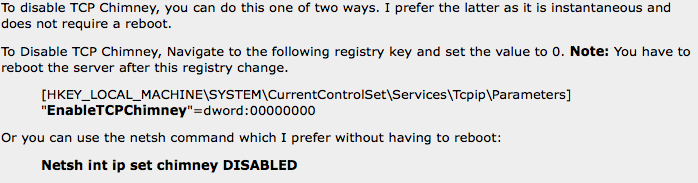
I chose to go route #2… the "netsh int ip set chimney DISABLED" command because a) it's not a registry hack and b) it doesn't require another reboot. I know, I reboot all the time, what's the problem? Well, I'm sick of rebooting. That's the reason.
You know what? It worked! Yay!
So, that's a long post, I know. It only really describes three problems and three fixes, but from my scouring of google and technet, these seem to be fairly common issues and I hope perhaps someone else can get some help based on my simplistic overview.
In our case, things have been really solid for about a month since making these changes. As I said at the beginning of the post, we just have a few dozen more users to migrate. I'm anxious to shut down the old box before it completely dies on us.
Have a great Thanksgiving!