As you've figured out already, I am not a very clever blog-title-writer-guy… I try to make my titles useful so you really know what I'm writing about. So, believe it or not, I'm actually going to tell you a little story about "Server-side Auto-Replies with Exchange 2007 / Outlook 2007."
Today I got an email from bossman asking me "is there a good way to do an auto-reply, server-side, with Exchange 2007 without an OOM (out of office message) indicator?" Hmm… I would assume so. There has to be, right? After further probing, it looks like LC.tv is doing another Invasion Message Series. I love the Invasion series. We've done this before, although it's been a few years. I know we did it in 2003, 2004, and possibly other years too. In this series, our attenders can nominate people whose lives have been radically altered by Jesus. Then Craig shares their story as an inspiration for others.
Anyway, so, we want people to email us their nominees to be invaded. And, we want their emails to have an auto-reply message like "Thanks for your nomination. We will add this to our list to be considered. Please don’t tell the person you’re nominating because we’d like to surprise them if we choose to invade them." In the past we've done this with web auto-reply forms, and manual replies. Those work great, but we wanted to do this straight inside email.
It's easier than I expected. Really. Create an account. Login. Open Outlook. Create a rule. Test it.
So, I created an account – again, cleverly named "Invasion" and gave it the appropriate email addresses.
I logged onto one of my Windows VMs (yes, I'm a Mac-guy now… is it possible to be an IT Architect, a Mac-guy, a Cisco zealot, and a Christian all at the same time?). I digress. I logged into Windows as the newly created Invasion user and Launched Outlook 2007. I had to set up the Mailbox, so I won't bore you with those details.
I need to create a rule, so I opened the Tools -> Rules and Alerts menu option highlighted below
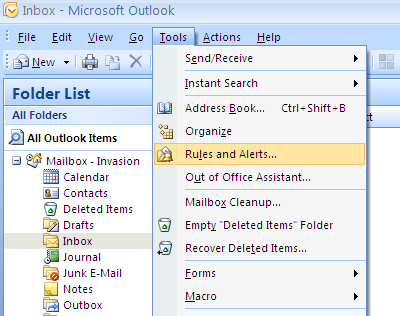
Enter the Rules and Alerts Wizard and choose "New Rule"
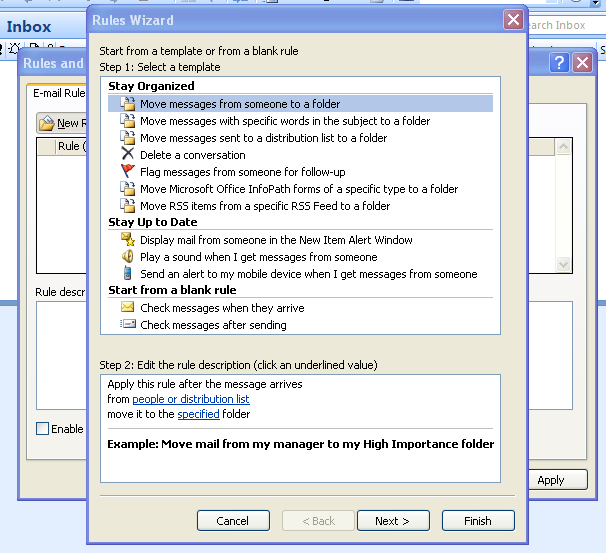
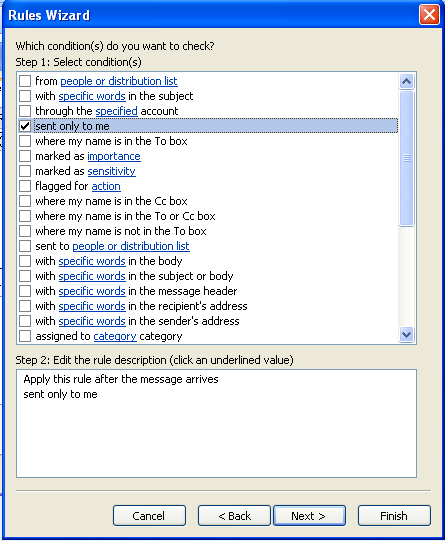
I wanted any incoming email to get an automatic "thank you" response. So, I chose the "Start from a blank rule – Check messages when they arrive" setting. Click next. The next screen is where you choose the conditions to check for. I want all emails, so I checked the "sent only to me" option and clicked Next
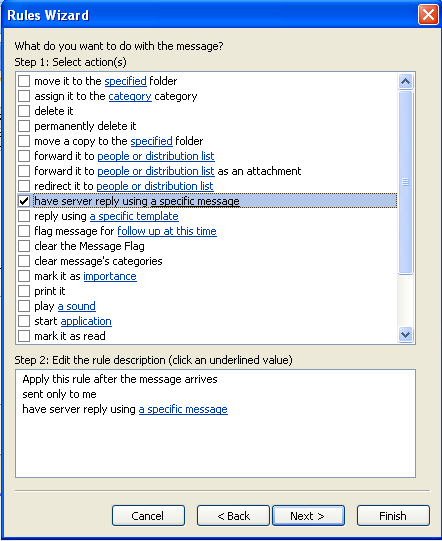
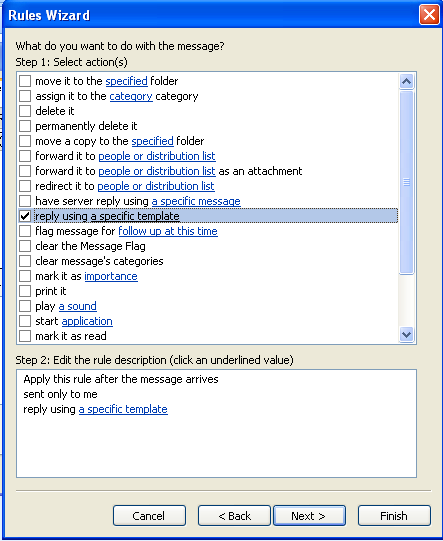
The next screen is where you choose the Action you want the rule to take. I want to reply, so I checked the "have server reply using a specific message" option. You'll notice that down in the Step 2 "a specific message" is highlighted blue. Click there.
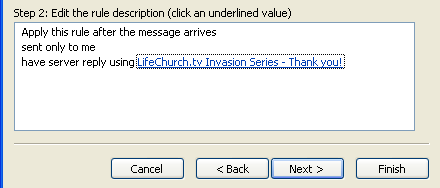
What opens up appears to be a new email. This is where I'll type my "thank you" email. Leave the To: and CC: fields empty. Make the subject line clever. Then type your message that you want auto-replied. When you're done, click Save & Close.

Now you see that Step 2 has changed… "a specific message" has been replaced by the Subject line of the email. Click Next.
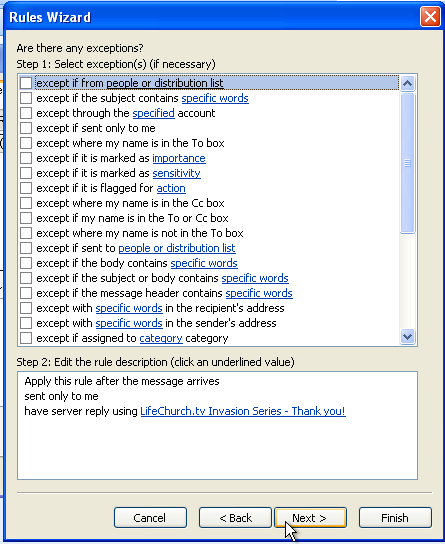
If you have any exceptions, choose them. I don't. click Next.
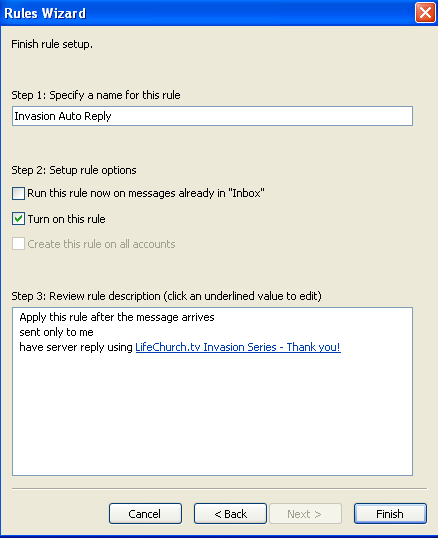
Give the rule a name – I called mine Invasion Auto Reply. Click Finish.
Now you can verify your rules, and see them and activate them. Click OK.
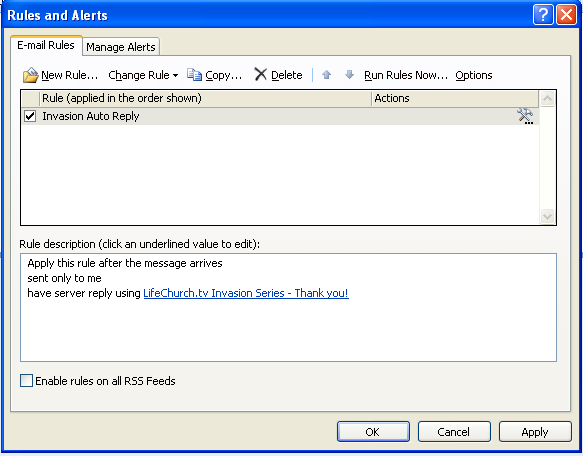
That's it! Time to test. Remember, this is a server-side rule, so you can close Outlook. What makes it a server-side rule you say? Well, if everything can happen "without logging in" – then it's a server side rule. If the rule requires somesort of interaction, or somesort of authentication, then it's a client-side rule. For example, if you wanted to automatically print an email, that's *NOT* server-side… just a simple folder-move, forward, or auto-reply *IS* server-side.
So, send an email. See what happens. I sent an email from my gmail account and got the following reply…
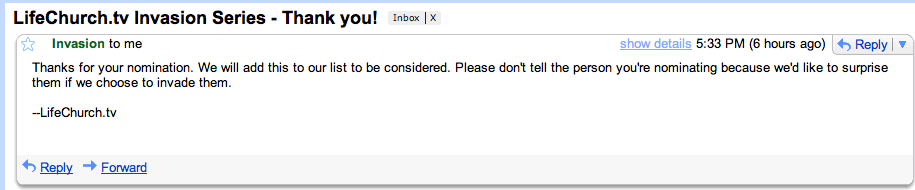
That's it! Success! Sorry for all the pictures. Sometimes I get a little screen-grab crazy.
I did this a lot at rhema for various reasons and uses. quite handy
we have tryed this but it only works for internal emails and outlook last to be open for this which doesn’t help
Hey Roy–
Sorry to hear that. That’s certainly a bummer. In our environment, this worked properly in Exchange 2003 and still currently works properly in Exchange 2007. It works for both internal and external emails. And, for us, Outlook does **NOT** have to be open.
I wonder what might be different with your environment versus ours? Have you done any diagnosis from the log files? Do you supposed your Network Admin folks are doing anything to prevent this from working on the server?
–DW
This works! I could only send from internal as well. Then i found a solution someone posted elsewhere.
You have to enable “Allow automatic replies” from Organization/Remote Domains under the “Format of original…” tab.
I just used the default that was there and made sure the allow both was selected on the general tab then the above.
Thanks Marc! Good catch!
–DW
@Roy
In Exchange 2003 you have to enable it from a different location.
Global Settings> Internet Message Formats> Default. Right-click Default (it’s the only entry in a default installation), select the Advanced tab, and enable the desired option(s):
-Allow out of office responses
-Allow automatic replies
-Allow automatic forward
-Halve
Thanks for uploading such a nice article.very good.
Thank You This worked perfectly!
Is there a way to insert the original subeject line in the reply?
You know Rob, I’m really not sure. That wasn’t a requirement for this project. I’m sure there’s somesort of way to script that if Exchange doesn’t provide it out of the box.
If you leave the subject of the auto response email blank it will use the subject of the incoming email in the response.
Thanks Terry!
–DW
You ‘da man, Marc. I was having issues with external senders too! Thanks!
This helped me SO MUCH!! It took me forever to find someone who mentioned how to get around the client only limitations. Thanks!!
I liked all the screenshots.
It appears that in Office365 you cannot leave the Subject line blank (thus keeping the original subject line). The rule gets an error when you save it. Bummer.